Grabb + QuickBooks Desktop
Automate the work around QuickBooks Desktop.
From incoming customer orders to inventory decisions and sales follow-ups.
Grabb is Commerce Operations software for CPG brands, distributors and manufacturers.
Connect QuickBooks Desktop to automate repetitive order processing, identify inventory and demand changes, and turn customer buying activity into the next commercial action.
Your company file stays in place. Grabb runs configured workflows around it and brings exceptions to your team when decisions are needed.
- QuickBooks Desktop integration
- Connects via QuickBooks Web Connector (QBWC)
- QuickBooks remains your system of record
01
Order desk automation
From customer email to an order ready for fulfillment.
Why should your team spend the next several minutes downloading attachments, identifying customers, matching product codes, checking quantities and retyping order lines?
01
Capture
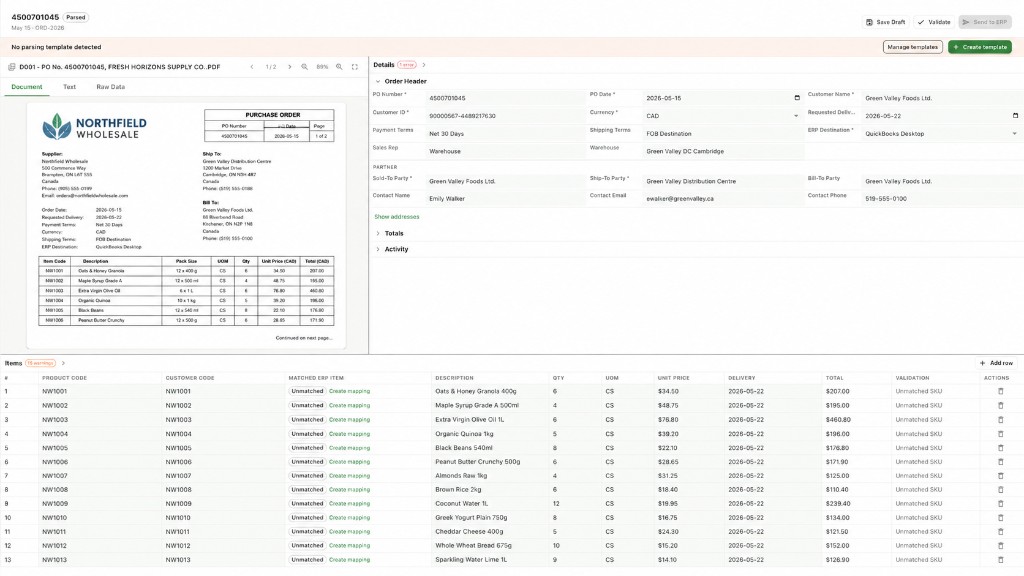
Customers continue sending orders through supported email, PDF and spreadsheet formats. Grabb captures the incoming purchase order and extracts its information.
02
Match
Identify the customer, product references, SKU codes, units and quantities. Match the order against configured business records.
03
Validate
Apply configured validation rules to customer references, products, quantities and applicable prices. Identify incomplete information or uncertain matches.
04
Handle exceptions
Route uncertain or invalid information to the appropriate person for review. Human intervention focuses on exceptions rather than every routine data-entry step.
05
Move into QuickBooks
Once validated and approved under the configured workflow, send the supported sales order or related update to QuickBooks Desktop through QuickBooks Web Connector.
Less manual entry. Fewer handoffs. More orders moving.
02
Integration data flow
How Grabb connects with QuickBooks Desktop
Grabb connects to the customer, product, sales, inventory and purchasing records in QuickBooks Desktop to help automate commercial work. Some records flow from QuickBooks Desktop into Grabb. Others support communication in both directions, allowing Grabb to create or update supported records through configured workflows and QuickBooks Web Connector.
 QuickBooks Desktop
 Grabb
| QuickBooks Desktop | Data flow | Grabb |
|---|---|---|
| Customers | Two-way data exchange between QuickBooks Desktop Customers and Grabb Customers | Customers |
| Products | Read from QuickBooks Desktop Products into Grabb Products | Products |
| Sales Orders | Two-way data exchange between QuickBooks Desktop Sales Orders and Grabb Sales Orders | Sales Orders |
| Sales History | Read from QuickBooks Desktop Sales History into Grabb Sales History | Sales History |
| Inventory | Read from QuickBooks Desktop Inventory into Grabb Inventory | Inventory |
| Estimates | Two-way data exchange between QuickBooks Desktop Estimates and Grabb Estimates | Estimates |
| Vendors | Read from QuickBooks Desktop Vendors into Grabb Vendors | Vendors |
| Purchase Orders | Two-way data exchange between QuickBooks Desktop Purchase Orders and Grabb Purchase Orders | Purchase Orders |
| Payments | Read from QuickBooks Desktop Payments into Grabb Payments | Payments |
| Credit Memos | Read from QuickBooks Desktop Credit Memos into Grabb Credit Memos | Credit Memos |
- Read from QuickBooks Desktop: records flow from the company file into Grabb.
- Two-way data exchange: supported records can flow between Grabb and QuickBooks Desktop through QBWC. Bidirectional does not mean every field is editable or that synchronization is instantaneous.
QuickBooks Desktop remains your system of record.
Grabb uses your QuickBooks Desktop records to automate order processing and support inventory, demand and sales workflows. Supported transactions and changes can be sent back to the company file through QuickBooks Web Connector, while your team stays in control of rules, approvals and exceptions.
03
Beyond accounting
One QuickBooks connection. More of your business running.
QuickBooks Desktop keeps the books. Grabb runs the commercial work around them.
Automated Order Desk
Stop retyping customer purchase orders.
Process incoming customer purchase orders, match products and customer information, apply configured rules and route exceptions for review.
Reduce manual order entry and move validated sales orders into supported QuickBooks Desktop workflows.
Order automationInventory and replenishment
Know what needs replenishing.
Use product movement, sales demand and available inventory records to identify changing SKU velocity, potential shortages and replenishment requirements. Supported purchase-order workflows cover both incoming customer POs and supplier replenishment POs with QuickBooks Desktop.
Give purchasing and operations a clearer view of what requires attention, with supported PO updates in QuickBooks Desktop.
Demand planningSales execution
Know which customers need attention.
Identify customers with declining purchase frequency, missed reorders or opportunities to expand their product assortment. Give sales teams priorities based on buying activity.
Help reps act on account changes rather than searching through transaction reports.
SalesDemand planning
Plan from actual buying patterns.
Use available sales history to estimate demand, review seasonality and understand changing product velocity.
Support more informed purchasing, inventory and production planning. Forecasts remain estimates.
DemandFulfillment
Run fulfillment work inside Grabb.
Use order and inventory context inside Grabb to identify potential shortages, backorders and fulfillment risks, and keep operators focused on the orders that need attention.
Fulfillment workflows run in Grabb while QuickBooks Desktop remains the accounting system of record.
FulfillmentAccounts payable
Parse supplier invoices into QuickBooks bills.
Extract supported supplier invoice documents, match them to purchasing context where configured, and create the supported Bill in QuickBooks Desktop.
Reduce repetitive AP entry while keeping approvals and exceptions with your team.
Integrations
04
Connection
Connect QuickBooks Desktop. Keep your company file.
Sign up for Grabb, then connect through QuickBooks Web Connector (QBWC). Your company file stays on your machine.
- Sign up for Grabb
- Install QuickBooks Web Connector (QBWC)
- Add the Grabb application file and authorize access
- Confirm sync schedule and permissions
- Configure operating rules
- Enable workflows and review exceptions
QBWC runs on a Windows machine with access to the QuickBooks Desktop company file. Available objects, operations and synchronization behavior depend on your QuickBooks Desktop edition, company-file permissions and configured Grabb workflows.
05
Customer results
Less manual work. More room to run the business.
“It turns our sales data into clear next steps for field reps, internal sales and a demand signal we can trust.”

98% POs parsed on routine cases after one week
06
Common questions
Built for businesses moving products through repeat orders.
Grabb is designed for CPG brands, distributors and manufacturers handling customer accounts, SKUs, repeat orders, inventory and multiple commercial workflows. It is especially relevant when incoming order formats differ, product matching consumes time and administrative work grows with transaction volume.
Does Grabb replace QuickBooks Desktop?
No. QuickBooks Desktop remains the accounting system of record. Grabb connects to supported data through QuickBooks Web Connector and helps execute configured Commerce Operations workflows around it.
How does Grabb connect to QuickBooks Desktop?
Grabb connects through Intuit's QuickBooks Web Connector (QBWC). You install QBWC on a Windows machine with access to the company file, add the Grabb application file, authorize access in QuickBooks Desktop, and keep the connector running on the configured schedule.
What data does Grabb read from QuickBooks Desktop?
Grabb reads product data, sales history, inventory, vendor information, payments and credit memos. Customers, sales orders, estimates and purchase orders support bidirectional data exchange according to the confirmed integration mapping and company-file permissions.
What data can Grabb write to QuickBooks Desktop?
Grabb supports bidirectional data exchange for customers, sales orders, estimates and purchase orders. Purchase-order workflows cover both incoming customer POs and supplier replenishment POs. Specific create and update operations depend on QBWC behavior, permissions and configured workflows. Not every field or operation is available.
Can Grabb automate customer PDF purchase orders?
Yes. Grabb processes supported customer purchase orders received through email, PDF and spreadsheet workflows. It extracts information, matches customer and product references, applies configured checks and routes exceptions when required. Supported outputs can include sales orders or related QuickBooks Desktop updates confirmed during setup.
Do customers need to change how they send purchase orders?
No, not for supported email, PDF and spreadsheet formats. Their existing documents can be processed through configured Grabb workflows.
Does Grabb work with QuickBooks Online?
Yes. Grabb also supports QuickBooks Online through a different online authorization process. Online connection requirements and available workflows differ from QuickBooks Desktop.
Can Grabb help with inventory planning?
Yes. Grabb uses available sales, product and inventory information to identify demand changes, SKU velocity and replenishment needs. Specific capabilities depend on the data available and workflows configured.
Grabb is an independent software product that integrates with QuickBooks Desktop. QuickBooks and QuickBooks Web Connector are trademarks of Intuit Inc. No endorsement by Intuit is implied.